I build the tools that do the boring work for you.
Telegram bots, Mini Apps, browser extensions and automations - built around how your team actually works. From a quick idea to a tool your whole office uses every day.
Every Monday a fresh list of newly registered car-hauling carriers from the official FMCSA register lands in Telegram - filtered, sorted by priority, with phone and email - ready for outreach.
Telegram bot · USDT
Crypto payments for bots
Accept USDT (TRC20) right in a Telegram bot: every order gets its own amount, the blockchain is checked every minute and access turns on by itself - no payment provider, nothing to confirm by hand.
Next project
Your project here
Extensions, bots and automations for teams of any size - tell me what slows you down.
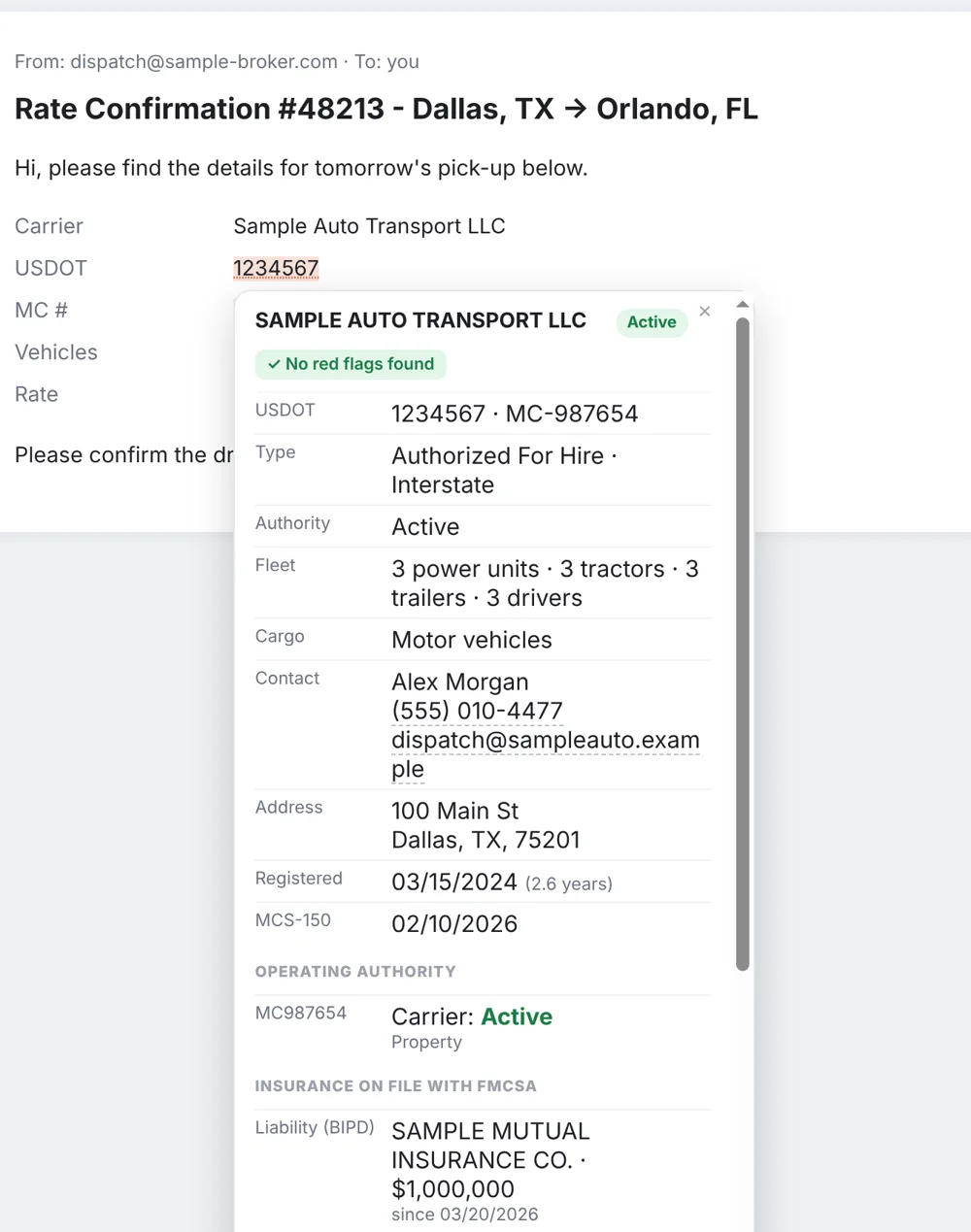
DOT/MC Lookup underlines USDOT and MC numbers on any web page - load boards, broker emails, rate confirmations. Hover one and see the company's authority, insurance, safety record and red flags from official FMCSA data - whether it's a carrier you're hiring or a broker offering you a load. No copy-paste, no daily limits.
It works on the sites you already use - nothing to set up.
1
Add it to your browser
Chrome, Brave, Edge or Opera. An orange magnifier appears in the toolbar.
2
Numbers get underlined
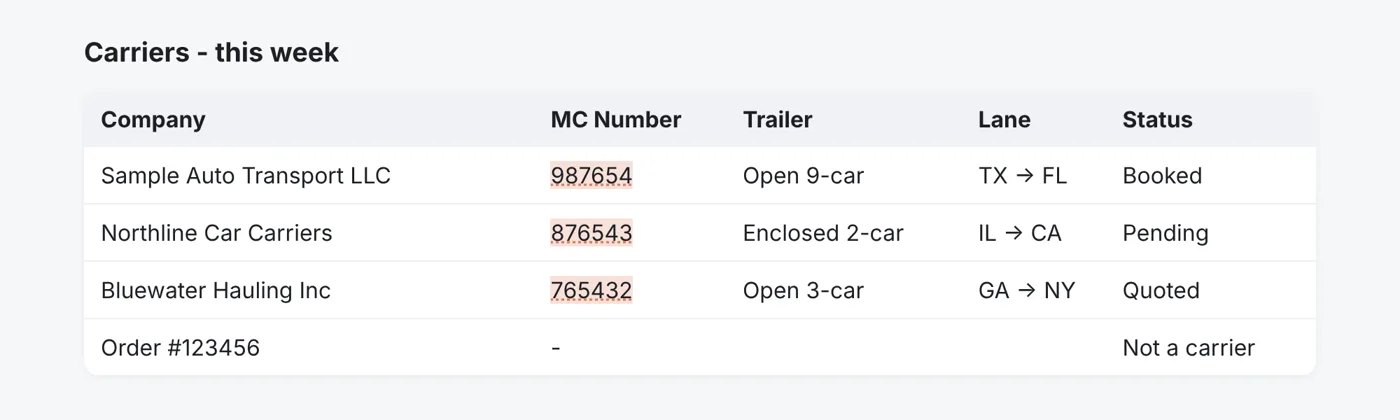
"USDOT 1234567", "MC# 987654", or a number under an "MC Number" column - it recognises them all.
3
Hover for the profile
Rest the mouse on a number for a moment - the carrier card opens right there. Move away and it closes.
⌥ Option
Company name instead of a number? Hold Option (Alt on Windows) and hover over the name - an exact match opens its card straight away, otherwise you get a short list to pick from. You can also select the name and right-click → Look up carrier.
Screenshots
What you'll see
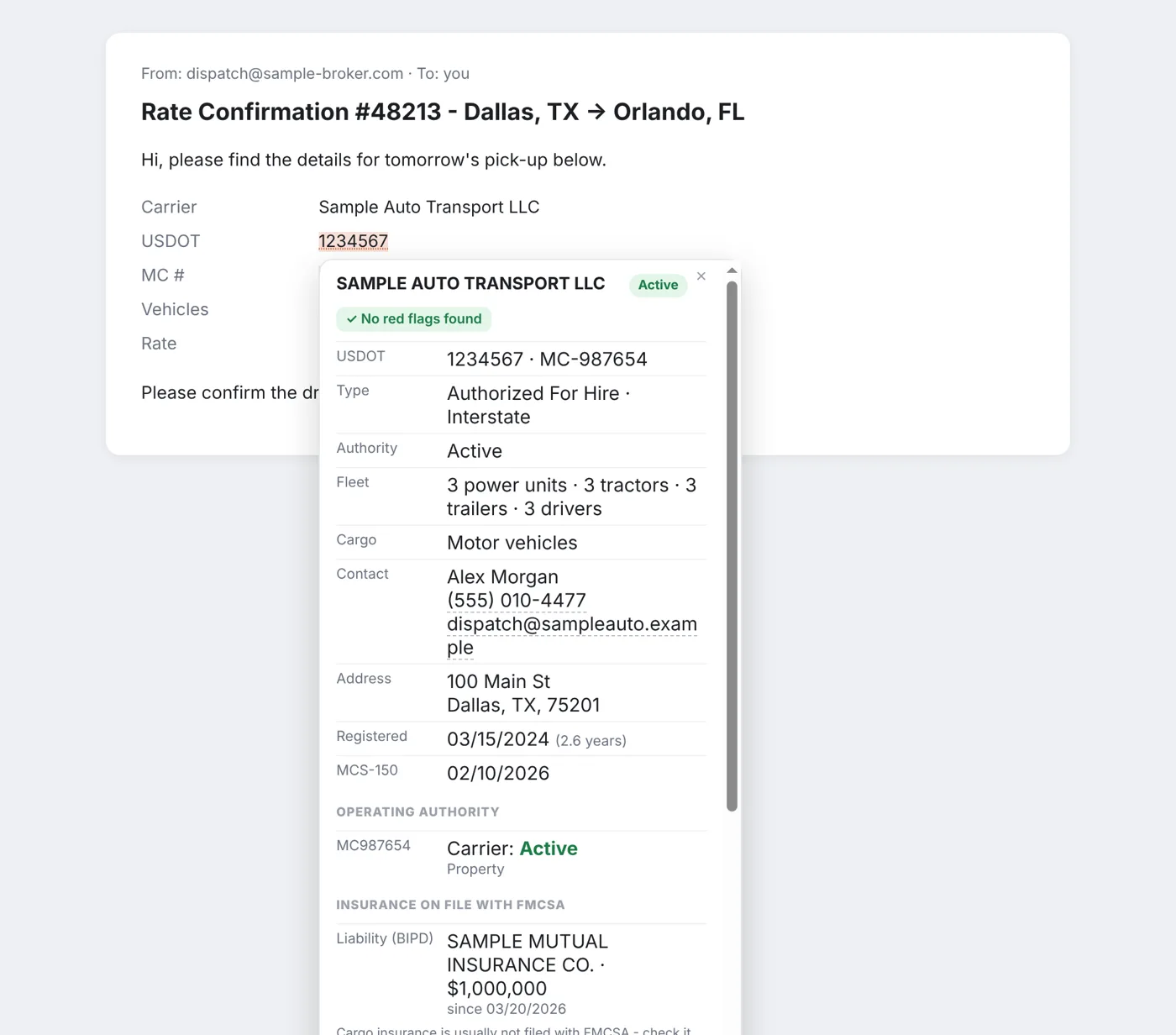
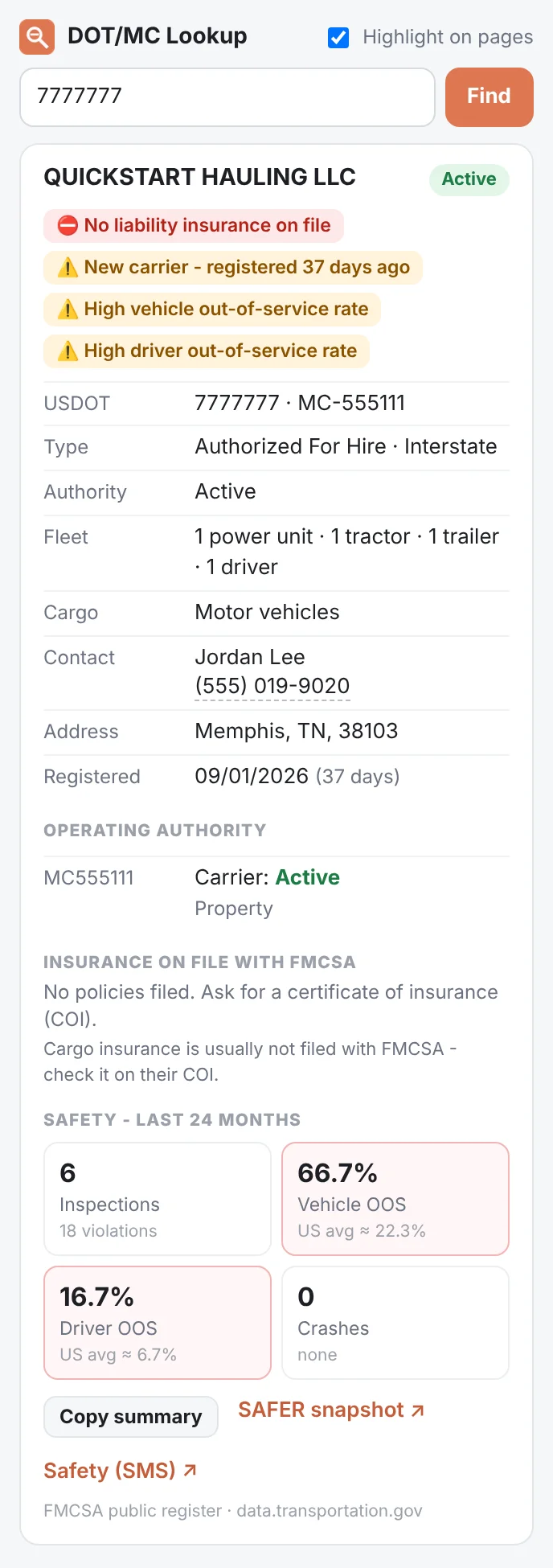
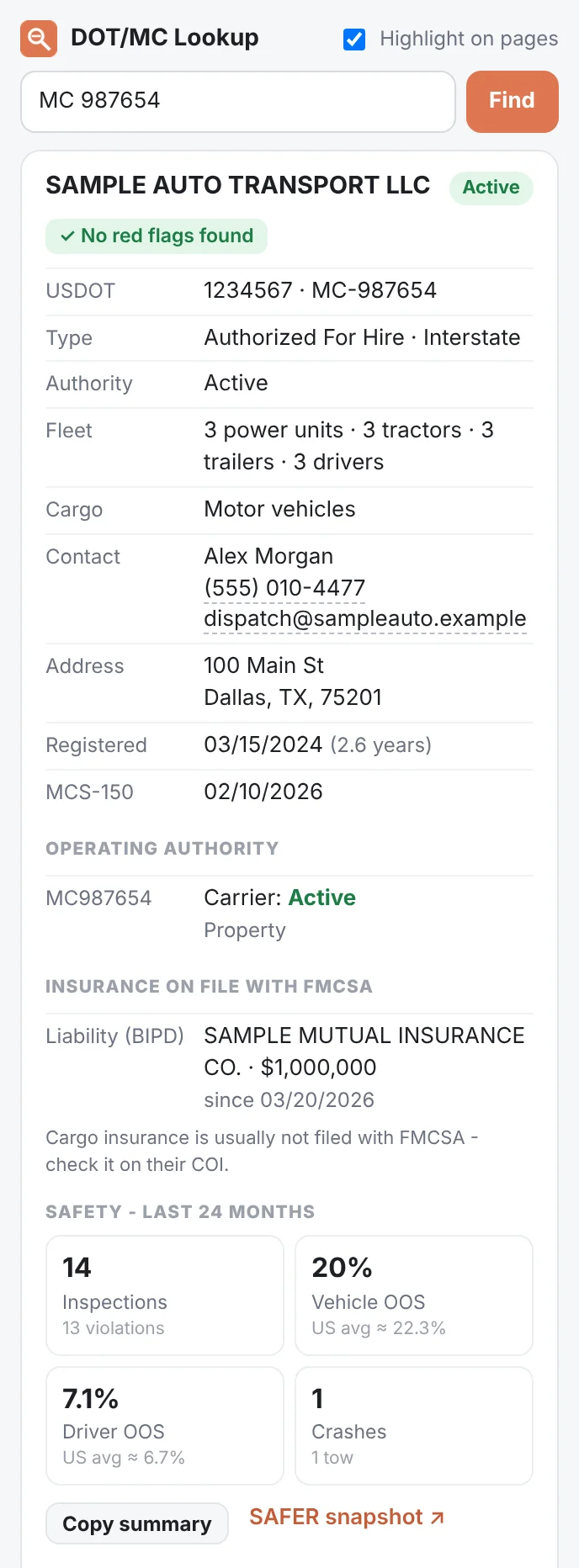
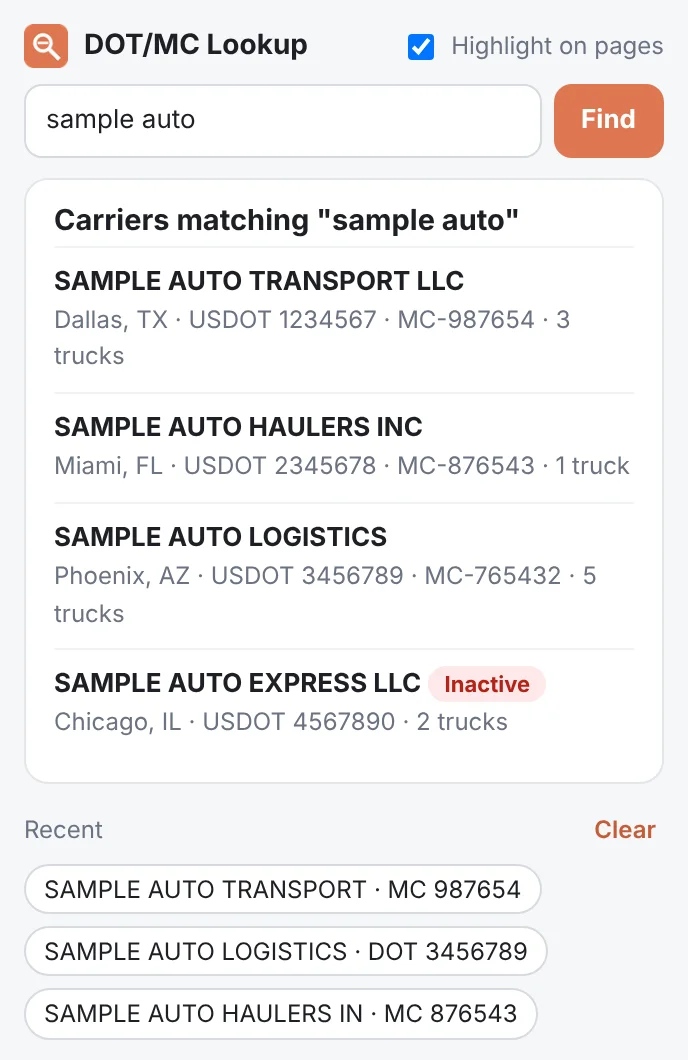
Hover a USDOT or MC number in an email or a rate confirmation - the carrier card opens right there.Red flags at the top: no insurance on file, brand-new authority, high out-of-service rates, pending revocation.Authority, insurance and a 24-month safety summary - and "Copy summary" for your notes or the broker.Search by USDOT, MC or company name in the toolbar popup. Recent lookups stay one click away - "Clear" wipes them.Numbers in tables are found by their column - order numbers and ZIP codes are left alone.
Screenshots use made-up sample carriers.
Features
Everything you check before booking
🚩
Red flags first
No liability insurance, inactive or brand-new authority, revocation pending, high out-of-service rates, fatal crashes - shown at the top of the card.
📞
Phone check
If the phone next to the number on the page isn't on the company's FMCSA record, the card warns you and shows the official number to call instead - the most common sign of a fake.
🕒
Authority age & recent changes
When each MC was granted, a warning for authority under a year old, and anything that changed lately: revoked or reinstated authority, new phone, email or address since you last checked.
📝
Team notes
Mark a carrier or broker "Worked with", "Caution" or "Avoid" and add a note - it shows at the top of the card next time. Export your notes to share them with the team.
🛡
Insurance on file
Liability (BIPD) and other filings: insurer, coverage amount, effective date - and a warning when a policy is about to be cancelled.
🪪
Operating authority
Carrier, contract and broker authority with their status and grant date, plus pending applications - so carriers can check a broker just as easily.
📊
Safety record
Inspections, vehicle and driver out-of-service rates next to the US average, and crashes from the last 24 months.
🏢
Search by company name
Hold Option (Alt) and hover over a name, right-click "Look up carrier", or type it in the popup.
📋
Copy summary
One click copies name, USDOT/MC, insurance, safety and flags as text - paste it into notes, Slack or an email.
♾️
Unlimited and free
No account, no daily cap. Official data from the US DOT's open FMCSA register - the same source as SAFER.
🧩
Leaves pages alone
Highlighting is drawn by the browser on top of the text, so load boards and web apps keep working exactly as before.
🌙
Light and dark
The card follows your system theme. Recent lookups stay in the popup until you clear them.
Install
Ready in a minute
Until it's in the Chrome Web Store, add it like this:
Download the zip and unzip it to a folder that will stay (for example Documents).
Open chrome://extensions (Brave: brave://extensions, Edge: edge://extensions) and switch on Developer mode.
Click Load unpacked and choose the dot-mc-lookup folder.
Pin the orange magnifier to the toolbar and reload the pages you work on.
FAQ
Questions
Is it really free and unlimited?
Yes. No account, no daily limit, no ads.
Can carriers use it to check brokers?
Yes. Hover the broker's MC number in the load or the rate confirmation - you'll see their broker authority, when it was granted, the bond on file and any recent changes.
Can my team share notes?
Notes are saved in your browser. In the toolbar popup click Export to save them to a file, and your teammates click Import to add them - newer notes win.
Where does the data come from?
The FMCSA open data the US DOT publishes on data.transportation.gov: the carrier register, licensing and insurance filings, and roadside inspection and crash records. A brand-new carrier can take a few days to appear.
How do I look up a company by name?
Hold Option (Alt on Windows) and hover over the name. Or select it, right-click and choose "Look up carrier", or type it in the toolbar popup.
Does "no red flags" mean the carrier is safe?
It means nothing alarming is in the public FMCSA records. Always get the carrier's own certificate of insurance - cargo insurance, for example, usually isn't filed with FMCSA.
A number is a link on the page - how do I open the card?
Just hover over it - the card opens after a moment. A normal click still opens the link as usual.
Nothing is underlined on a page. Why?
Reload the page once after installing or updating. Then click the toolbar icon - it tells you how many numbers it found. Many load boards show only the company name: use Option + hover on it.
HaulHawk watches the major car-hauling load boards around the clock and sends the loads that fit your truck straight to Telegram, seconds after they're posted. One tap to call the shipper.
Pickup: Today · Open · Operable ✅
🏢 Auto shipper · +1 (555) 010-000322:14
📞 Call📋 SMS🗺 Route⭐️ Save🚫 Block
How it works
Set it once. Get loads all day.
No new app to learn - it lives in the Telegram you already use.
1
Open the bot
Start HaulHawk in Telegram and open the search screen with one tap.
2
Describe your lane
Cities with a radius, whole states or a route with stops. Minimum price and $/mile, trailer type, vehicle status.
3
Call first
Matching loads arrive in seconds with the shipper's phone, the route and how the rate compares to the lane.
Features
Built by dispatchers, for dispatchers
⚡️
Seconds, not minutes
New loads are checked every few seconds, so you hear about them before the board gets crowded.
🗺
Route search
Find loads along your way home - pickup and drop-off inside a corridor around your route.
💰
Deal score
Every alert shows how its $/mile compares with the average for that lane.
📞
One-tap call & SMS
Call the shipper or copy your ready-made SMS straight from the alert.
🚫
Block companies
Never hear from a shipper you don't work with again.
👥
Made for teams
Each dispatcher gets their own searches and alerts - perfect for a whole office.
Pricing
One plan, everything included
All features, all load boards, unlimited searches. Pay for longer and save.
So we can switch on your access right after payment. Find it in Telegram → Settings. No username? Open this page from the bot: More → Subscription.
Prices in USD and include VAT / sales tax - the price you see is the price you pay. Plans renew automatically - cancel any time. 14-day money-back guarantee. By subscribing you agree to our Terms and Refund Policy. Orders are processed by Paddle.com, our Merchant of Record.
Secure checkout by Paddle
Apple PayGoogle PayVisaMastercardPayPal
FAQ
Questions
Is there a free trial?
Yes - every new account gets 5 days free with all features. Just start the bot in Telegram.
Which load boards does it watch?
The major car-hauling load boards used by US auto-transport dispatchers. You choose which ones each search uses.
Do I need to install anything?
No. HaulHawk works inside Telegram on iPhone, Android and desktop.
Does the plan renew automatically?
Yes, at the end of each period, so your alerts never stop. Cancel any time from the receipt email - you keep access until the period ends.
Can I get a refund?
Yes - there is a 14-day money-back guarantee. Request it at paddle.net or email omvstudio.dev@gmail.com. See our Refund Policy.
Who do I contact for support?
Write to omvstudio.dev@gmail.com or use Contact us inside the bot. Payment and invoice questions are also handled by Paddle at paddle.net.
How do I pay?
Apple Pay, Google Pay, Visa, Mastercard or PayPal through Paddle, our payment partner. Prices already include taxes; Paddle issues the invoice.